
Offline Style Package
If you want your custom map styles and assets to be available offline, you can create an Offline Style Package and bundle it with your application.
The Offline Style Package is a solution for you if you want to:
- Use your custom map style in mobile applications or vehicles with limited or no connectivity.
- Reduce the number of requests and improve the map loading time.
How to download an Offline Style Package
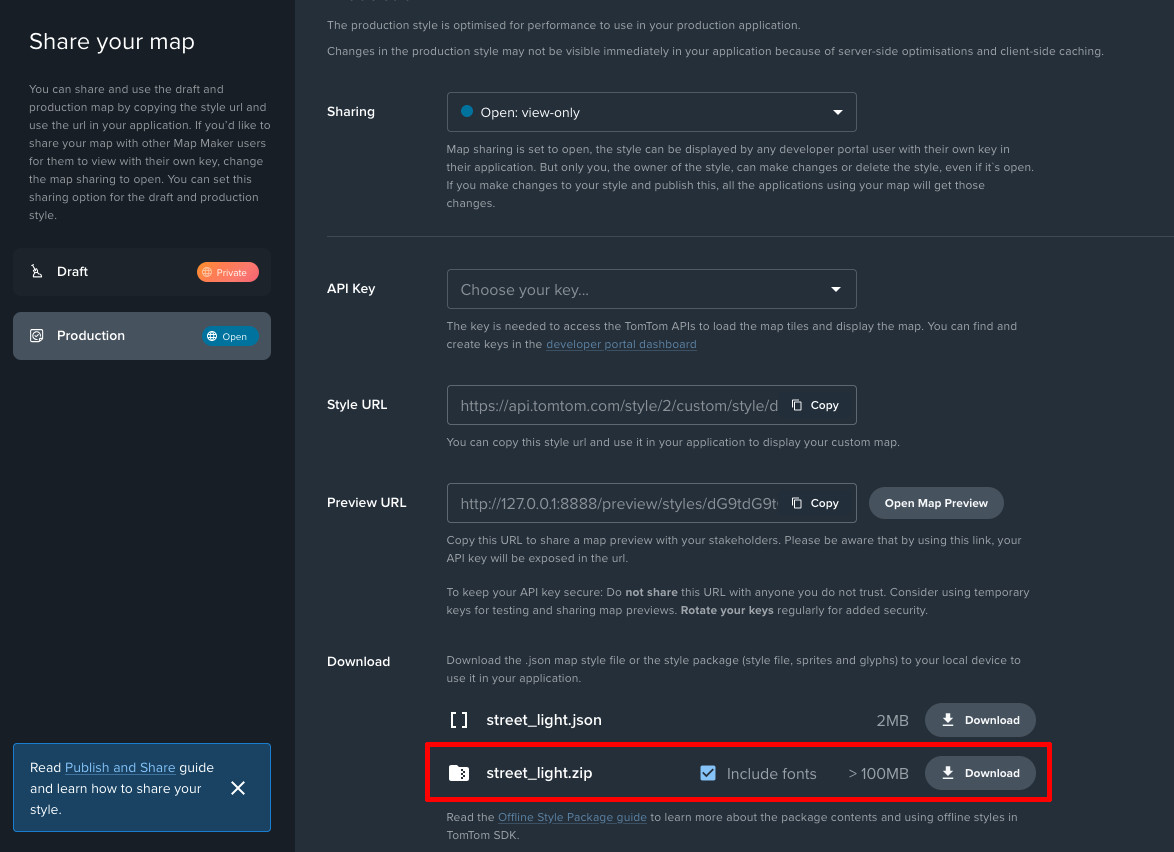
- Go to the Map Maker and open the style you want to use offline.
- Click the Share button.
- Find the Download section and download the package with the zip file extension.
You can exclude fonts to reduce the package size. Remember to:
- Include fonts in the initial download to to make sure offline styles renders correctly.
- Download fonts for each style you want to use offline, since different styles may utilize different fonts.
Package contents
The Offline Style Package contains the following files:
styles/-- styleId/---- style.json---- sprites/------ default/-------- sprite.png-------- sprite.json-------- sprite@2x.png-------- sprite@2x.jsonfonts/-- FontName/---- pbf/------ 0-255.pbf------ 256-511.pbf------ etc.pbfDirectory styleId matches style ID, which can also be found in the online style URL.