import { TomTomConfig } from '@tomtom-org/maps-sdk/core';
import { getKnob, setKnob, setKnobs, TomTomMap, TrafficFlowModule } from '@tomtom-org/maps-sdk/map';
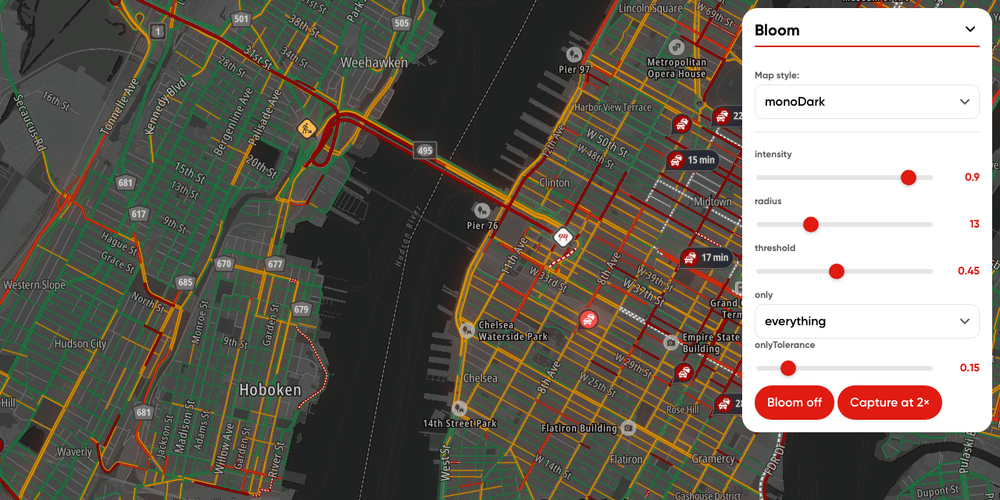
import { effectKnobCatalogue, MapEffects, type MapEffectsConfig } from '@tomtom-org/maps-sdk-plugin-map-effects';
import './style.css';
import { API_KEY } from './config';
import { initTogglePanel } from './togglePanel';
TomTomConfig.instance.put({ apiKey: API_KEY, language: 'en-GB' });
const useCases: Record<string, MapEffectsConfig> = {
'data-viz': { grade: { saturation: 0.35, brightness: 0.85 }, tint: { color: '#1f2937', opacity: 0.2 } },
'night-driving': { bloom: { intensity: 0.6, radius: 14, threshold: 0.55 } },
focus: { vignette: { intensity: -0.45 }, edgeBlur: { intensity: 10, reach: 0.45 } },
};
const map = new TomTomMap({
style: 'streetDark',
mapLibre: {
container: 'sdk-map',
center: [4.8952, 52.3702],
zoom: 13,
pitch: 60,
maxPitch: 85,
canvasContextAttributes: { preserveDrawingBuffer: true },
},
});
TrafficFlowModule.get(map, { visible: true });
const effects = new MapEffects(map);
const SAVED_KNOBS_KEY = 'map-effects-playground.knobs';
const saveKnobs = () =>
localStorage.setItem(
SAVED_KNOBS_KEY,
JSON.stringify(
Object.fromEntries(effectKnobCatalogue.map(({ id }) => [id, getKnob(effects, effectKnobCatalogue, id)])),
),
);
try {
setKnobs(effects, effectKnobCatalogue, JSON.parse(localStorage.getItem(SAVED_KNOBS_KEY) ?? '{}'));
} catch (error) {
console.warn('Dropped the saved effect knobs:', error);
localStorage.removeItem(SAVED_KNOBS_KEY);
}
const renderPanel = () => {
const container = document.querySelector('#ui-knobs') as HTMLElement;
container.innerHTML = '';
const sections = new Map<string, HTMLElement>();
for (const knob of effectKnobCatalogue) {
const [group, name] = knob.id.split('.');
const current = getKnob(effects, effectKnobCatalogue, knob.id);
let section = sections.get(group);
if (!section) {
section = document.createElement('div');
section.className = 'ui-section';
section.innerHTML = `<h4 class="ui-subheading" title="${knob.useCase}">${group}</h4>`;
sections.set(group, section);
container.appendChild(section);
}
const field = document.createElement('label');
field.className = 'ui-form-field';
field.title = knob.description;
if (knob.kind === 'color') {
field.innerHTML = `<span class="ui-form-label">${name}</span><span class="ui-color-swatch"><input type="color" value="${current}"></span>`;
const input = field.querySelector('input') as HTMLInputElement;
input.addEventListener('input', () => setKnob(effects, effectKnobCatalogue, knob.id, input.value));
} else if (knob.kind === 'colors') {
const selected = Array.isArray(current) ? (current[0] ?? '') : '';
const options = ['', ...knob.options].map(
(option) =>
`<option value="${option}"${option === selected ? ' selected' : ''}>${option || 'everything'}</option>`,
);
field.innerHTML = `<span class="ui-form-label">${name}</span><select class="ui-dropdown">${options.join('')}</select>`;
const select = field.querySelector('select') as HTMLSelectElement;
select.addEventListener('change', () =>
setKnob(effects, effectKnobCatalogue, knob.id, select.value ? [select.value] : []),
);
} else {
const { min, max, step } = knob.range;
field.innerHTML = `<span class="ui-form-label">${name}</span>
<div class="ui-slider-container"><input type="range" class="ui-slider" min="${min}" max="${max}" step="${step}" value="${current}"><span class="ui-slider-value">${current}</span></div>`;
const input = field.querySelector('input') as HTMLInputElement;
const value = field.querySelector('.ui-slider-value') as HTMLElement;
input.addEventListener('input', () => {
value.textContent = input.value;
setKnob(effects, effectKnobCatalogue, knob.id, Number(input.value));
});
}
section.appendChild(field);
}
};
renderPanel();
document.querySelector('#ui-knobs')?.addEventListener('change', saveKnobs);
const useCaseSelector = document.querySelector('#ui-useCase') as HTMLSelectElement;
useCaseSelector.addEventListener('change', () => {
effects.applyConfig(useCases[useCaseSelector.value] ?? {});
saveKnobs();
renderPanel();
});
document.querySelector('#ui-reset')?.addEventListener('click', () => {
effects.resetConfig();
localStorage.removeItem(SAVED_KNOBS_KEY);
useCaseSelector.value = '';
renderPanel();
});
document.querySelector('#ui-capture')?.addEventListener('click', async () => {
const canvas = await effects.capture({ pixelRatio: 2 });
window.open()?.document.body.appendChild(canvas);
});
initTogglePanel();