
Retrieving horizon data
Virtual Horizon acts as a digital assistant, extending the driver’s location context beyond their immediate view. It can be used by UI components to improve the driving experience, for example, by informing the driver of what is ahead. This information includes details about upcoming traffic events, vehicle restrictions, and more.
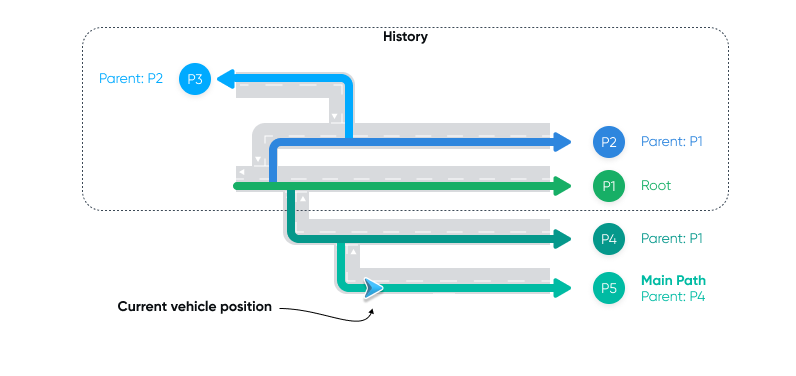
While navigating, you can use Virtual Horizon to retrieve detailed information about the horizon ahead of the vehicle, along the possible trajectories of the vehicle across the road network. The HorizonEngine delivers this information as a combination of a HorizonPosition and a HorizonSnapshot.
The SDK provides horizon data for various elements, including:
StreetElement- Information about a street, such as name.SpeedLimitElement- Information about speed limits.GeneralRoadPropertiesElement- Information about the road ahead, such as number of lanes, functional road class and driving side.CountryInformationElement- Information about the country ahead, including country code, speed limit unit and regional speed limits.VehicleRestrictionElement- Information about vehicle-specific restrictions ahead, such as maximum height allowed and restricted vehicle types.DangerousGoodsRestrictionElement- Information about dangerous good restrictions ahead, including ADR tunnel restrictions and hazardous load restrictions.
This guide focuses on demonstrating how to utilize the HorizonEngine for extracting specific speed-related data, including the current speed limit, the distance to the next speed limit, and the value of the upcoming speed limit. These insights allow you to create navigation applications that not only guide users accurately but also enhance their road experience by keeping them well-informed.
For more in-depth information, refer to the HorizonEngine API reference.
Configuring the horizon engine
Incorporating horizon data into your navigation application requires the following steps:
- Start navigation with or without a route, using the
OnlineTomTomNavigationFactoryto obtain aTomTomNavigationobject. TheHorizonEngineis automatically created during initialization of theTomTomNavigationobject. - Define your horizon data preferences by specifying
HorizonOptions, which the SDK uses to configure theHorizonEngine. - Add a
NavigationHorizonObserverto receive data based on your chosenHorizonOptions.
Specifying horizon options
First, define the set of HorizonOptions. To indicate that you are interested in SpeedLimitElement horizon elements, specify HorizonElementType in the list of element types of interest.
let mainPathSearchOptions = try MainPathSearchOptions( searchTime: Measurement.tt.minutes(10), searchDistancePolicy: ExplicitDistancePolicy( searchDistance: PathSearchDistance( maxHorizonLength: Measurement.tt.kilometers(10) ) ))let subPathSearchOptions = try SubPathSearchOptions( searchTime: Measurement.tt.minutes(5), searchDistance: PathSearchDistance( maxHorizonLength: Measurement.tt.kilometers(1) ))let elementTypes = [ HorizonElementType.pathGeometryType, HorizonElementType.speedLimitsType, HorizonElementType.streetType,]return try HorizonOptions( id: UUID(), elementTypes: elementTypes, mainPathSearchOptions: mainPathSearchOptions, subPathSearchOptions: [subPathSearchOptions], numberOfPaths: 4)Observing horizon updates
Declare a custom observer for horizon updates:
class SpeedElementHorizonObserver: NavigationHorizonObserver { private var snapshot: HorizonSnapshot? private var position: HorizonPosition?
var updateBlock: ((HorizonSnapshot, HorizonPosition) -> ())?
func didUpdateSnapshot(options: HorizonOptions, snapshot: HorizonSnapshot) { self.snapshot = snapshot }
func didUpdatePosition(options: HorizonOptions, position: HorizonPosition) { self.position = position
if let snapshot { updateBlock?(snapshot, position) } }
func didResetHorizon(options: HorizonOptions) { // do nothing }}Starting navigation
Then, start navigation with a route as described in the Starting navigation guide.
But, instead of adding an observer for route progress updates, make sure you add a NavigationHorizonObserver to listen to horizon updates for the horizon options you defined.
let navigationConfiguration = OnlineTomTomNavigationFactory.Configuration( navigationTileStore: try NavigationTileStore(config: NavigationTileStoreConfiguration(apiKey: "YOUR_TOMTOM_API_KEY")), locationProvider: locationProvider, routePlanner: routePlanner)
let tomTomNavigation = try OnlineTomTomNavigationFactory.create(configuration: navigationConfiguration)
let navigationHorizonObserver = SpeedElementHorizonObserver()
try? tomTomNavigation.addHorizonObserver(navigationHorizonObserver, options: options)
let routePlan = RoutePlan(route: route, routePlanningOptions: routePlanningOptions)let navigationOptions = NavigationOptions(activeRoutePlan: routePlan)
try? tomTomNavigation.start()Retrieving horizon data
With navigation started, you can listen to horizon updates and retrieve horizon data.
navigationHorizonObserver.updateBlock = { snapshot, position in self.displayCurrentSpeedLimit(snapshot: snapshot, position: position) self.displayNextSpeedLimit(snapshot: snapshot, position: position)}Once you have retrieved the data, you can use it to extract the value of the current speed limit.
guard let elements = snapshot.mainPath()?.getElements(type: .speedLimitsType), let element = elements.first(where: { element in element.startOffset < position.offset && element.endOffset >= position.offset }), let speedLimitElement = element as? SpeedLimitElement else { return }
switch speedLimitElement.speedLimit {case let .limited(speed: speed): print("Speed limit value: \(speed)")case .unlimited: print("Unlimited speed")@unknown default: print("Unsupported speed limit type")}You can also extract the distance to the next speed limit and the value of the next speed limit.
guard let elements = snapshot.mainPath()?.getElements(type: .speedLimitsType), let element = elements.first(where: { element in element.startOffset >= position.offset }), let speedLimitElement = element as? SpeedLimitElement else { return }
print("Distance to the next speed limit : \(snapshot.distance(to: element, from: position))")
switch speedLimitElement.speedLimit {case let .limited(speed: speed): print("Next speed limit value: \(speed)")case .unlimited: print("Next, unlimited speed")@unknown default: print("Next, unsupported speed limit type")}Next steps
Now that you know how to retrieve horizon data, here are the recommendations on what to explore next: