
Standard Map Display
Release notes for map style templates used to create styles that target TomTom Maps & Navigation SDK for Android with the Standard Map Display renderer.
If your application uses Premium Map Display, see Premium Map Display.
If you don’t target TomTom Maps & Navigation SDK for Android, see Map Display API.
SDK 2.5
Style version 1.0.0-4
Released: 2026-07-17
Compatibility: TomTom Maps & Navigation SDK for Android 2.5.x
Update required: Only if you move your app to SDK 2.5. Styles made for SDK 2.4 keep working with SDK 2.4. When you upgrade, update your style from the notification in Map Maker to get the changes below.
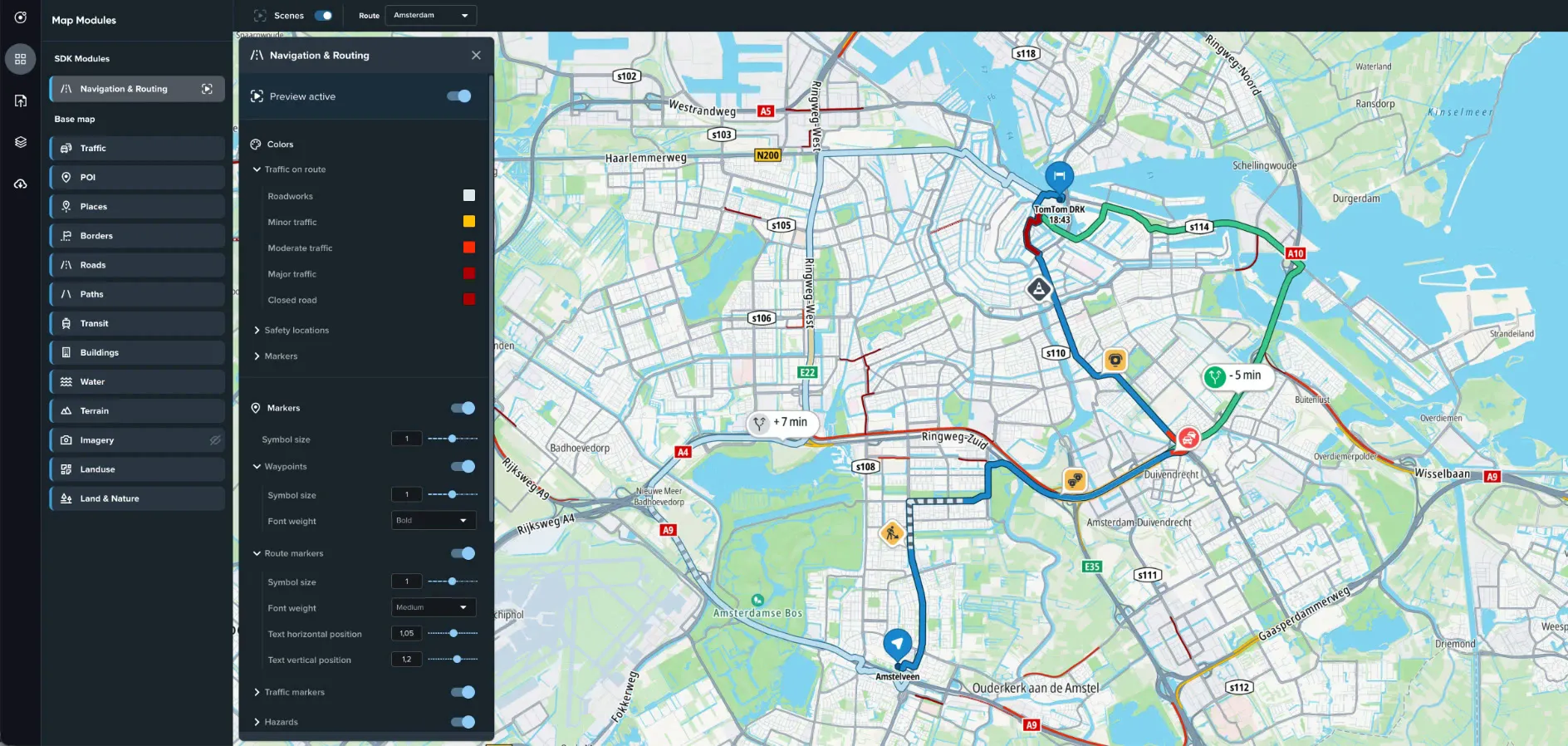
New
- Navigation & Routing module: customize how guidance features look in your app.
- Colors for traffic on the route, safety locations and markers.
- Traffic tube width on the route, with an optional scale-based width.
- Markers for waypoints, the route, traffic, hazards, safety locations, traffic lights and traffic signs, with their symbol size.
- A minimum zoom level for safety zones.
- Route colors, route width and instruction arrows can only be customized in Premium Map Display styles.
- POI: Custom automotive brand controls in the POI module. Enter a primary and a secondary brand name, and POIs of those brands use your own icons from the style’s sprite and are shown before other POIs.
- Upload an icon for each category you want to brand. A matching POI whose icon is missing from the sprite is shown without an icon.
- Name each icon
poi-<category>-<brand name>when you upload it. Map Maker adds thecustom-prefix because there is no matching asset to replace. For example, with the brand nameTomTom, uploadpoi-vehicle_dealer-TomTom. It’s stored ascustom-poi-vehicle_dealer-TomTomand replacespoi-vehicle_dealerfor TomTom vehicle dealers. - A POI matches when its brand contains the name you entered, so
TomTomalso matchesTomTom Service Center. The match is case-sensitive.
Changed
- Map, traffic, hillshade and satellite tiles now load from version 2 of the Orbis Map Display and Traffic APIs. Map attribution links point to the updated TomTom product attributions page.
- Traffic incidents now use the version 2 incident data. Incident markers, jam markers and jam lines use named values such as
majororroadWorksinstead of numeric codes, and delays are read fromdelay_in_seconds. If you edited the filters of traffic incident layers in the layer editor, check them after you update.
SDK 2.4
Style version 0.7.1-5
Released: 2026-06-24
Compatibility: TomTom Maps & Navigation SDK for Android 2.4.x
Update required: No. This is the first style version tracked on this page. The changes below are compared with the style version for SDK 2.3.
New
- Roads: Unify road colors at large scales uses one road color and one outline color for all road types when zoomed in, to reduce distraction while driving. It’s on by default in the driving templates and off in the others.
- Roads: a Maximum zoom level for route shields. Shields are hidden above this zoom level (default 18) to reduce clutter.
- Water: Fade water at high zoom gradually fades out water bodies when zoomed in, with controls for the start and end zoom levels and the end opacity. It’s on by default in satellite templates.