Driving with a route
Request accessOverview
Once a destination is selected and a route is selected, the user gets guidance to the destination.
Guided driving
The Guidance view provides users detailed guidance instructions (both visually and verbally) together with visualized route paths on the map. The map view automatically adjusts to show the most optimal route and next manoeuvre view.
The ETA panel provides a real-time overview of the journey by indicating when the user will arrive at the final destination, including battery level at arrival, remaining duration, remaining distance, and live traffic information.

Phases of Audio instructions
Drivers receive guiding instructions through 3 progressive phases as they approach a manoeuvre, starting far in advance to ensure adequate preparation. The Early phase provides audio guidance to give the driver an advance notice and enough preparation time for the upcoming action. The Main phase is announced when driver is close enough to the manoeuvre to start preparing for an action. Finally, the Confirmation phase reinforces the action as the driver approaches the manoeuvre point.
Departure instruction
Departure is a first manoeuvre of every route. Unlike other instructions that guide through specific manoeuvres (turns, exits), departure instruction orients the driver at the start of the drive. It does not direct a manoeuvre — it confirms to driver that navigation session has begun.

Turn instruction
The turn instruction is applied at road crossings. The arrow represents the geometry of the intersection by reflecting the angle of the turn to help the driver to make the correct manoeuvre.

Roundabout instruction
For Roundabouts, the manoeuvre arrow schematically represents the Roundabout geometry and target exit direction.

Chain instruction
If multiple manoeuvres are encounered in close proximity to each other, the guidance will provide an additional instruction for the consecutive manoeuvre underneath the first instruction. This helps the driver prepare for the consecutive manoeuvre even before starting the first one.

Guidance on highway
On Highways, the guidance provides additional information that is reflected on road signposts - road numbers, the city names the driver will be heading towards, and highway exit numbers.

Lane guidance
For multi-lane road intersections, the guidance provides a schematic lane visualisation at the manoeuvre point ahead. The lanes the driver needs to take at the upcoming manoeuvre are highlighted.

Guidance information prioritization
Guidance information, including the consecutive manouevre has the priority over upcoming events. The furthest upcoming event will be hidden first.

$~$

Follow the road
When entering a long uninterrupted road stretch, the guidance provides the Follow the road instruction, to reassure the driver no action is needed.

HOV lane guidance
On a highway, the guidance provides information of High Occupancy Vehicle (HOV) lanes — also known as carpool lanes or diamond lanes. Both the entry and exit point of HOV lanes are announced.


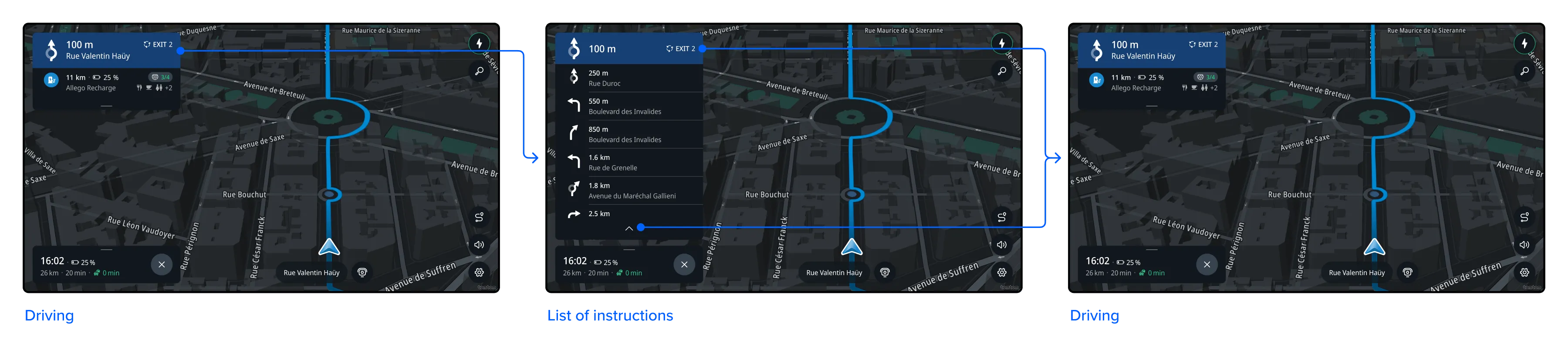
List of instructions
The list of instructions provides drivers with a clear overview of all manoeuvers and relative distances for the active route.

Current street
The current street is shown on the map indicating the name of the street and a road shield where the driver is located. On highways, only the road shield is shown. Driving with a route, only the name of the street is shown.

Heading
In the US, the heading of the car is shown on the map. It provides real-time information via cardinal (N, S, E, W) and ordinal (NE, NW, SE, SW) abbreviations. It is shown during active navigation and in free-driving mode.

Flows
Instruction phases
Instructions are announced in 3 phases: early, main and confirmation phase. Different sets of directional information are exposed at each phase.

Showing the list of instructions
When tapping the guidance instructions, the list of instructions is shown. All instructions from the drivers current position to the final destination are presented.